
Aadhaar Card Online Correction

Now you can do corrections of your Aadhaar Card Online by just spending few minutes you can get your Aadhaar Card mistakes get corrected.

Aadhaar Card Online Correction

If any of these below details like.:


Name
Gender

Date of Birth


Address


Mobile Number

On Aadhaar Card are wrong or have any spelling mistakes than you can correct it online. The process how you can update or correct your Aadhaar Card mistakes we will explain it to you in below steps.
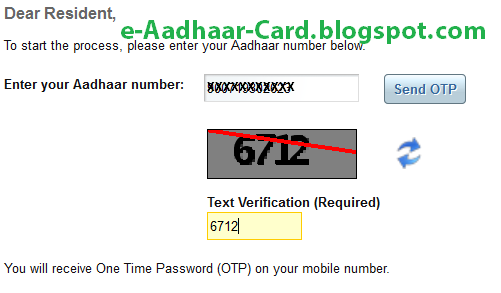


Aadhaar Card Online Correction - OTP


  • Enter you Aadhaar Number in the text-box and enter the captcha text which is showed below and then click on Send OTP


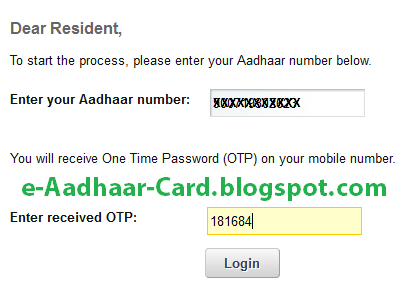
Aadhaar Card Online Correction - One Time Password


  • Shortly you will receive OTP (One Time Password) on your registered mobile number, just enter the OTP which you have received on your mobile number and click on login.


Aadhaar Card Online Correction - Update Data


  • In this screen you will be able to see what correction you want to do, it will list Name, Gender, DOB, Address, and Mobile. You can select any of these details to get it done corrected. Select any of these data which is wrong on your Aadhaar Card and which you want to make it correct and then click on submit.


Aadhaar Card Online Correction - Correct Details

It will give you columns to enter the new details to enter that is to make correction. Just enter it and click on Submit Update Request and follow the steps mentioned in the next step. 

Also Read: How to Remove Aadhaar Card PDF File Password

Comments

  1. sir i forget my phone number then how get i adhaar number if i want change my phone number then what will i do ?

    ReplyDelete
  2. i lost my registered mobile how could i get otp to my new number to update my details in aadhaar

    ReplyDelete
    Replies
    1. Dear Pravesh Sharma,

      Just follow this article: http://e-aadhaar-card.blogspot.com/2014/03/how-to-download-e-aadhaar-card-pdf-online-with-new-mobile-number.html

      You will be easily able to get the OTP on your new mobile number to download your Aadhaar Card PDF

      Delete
  3. SIR/MADAM I APPLY FOR NAME CORRECTION IT TOOK HOW MUCH TIME

    ReplyDelete
  4. sir/madam I apply for name correction it took how much time.

    ReplyDelete

Post a Comment

Popular posts from this blog

UIDAI Standard Certificate Format for Aadhaar Enrolment Update Form

UIDAI, the Unique Identification Authority of India has released a fixed standard format of Certificate for Aadhaar Enrolment Update. Aadhaar Applicants and those who want to update their Aadhaar will now have to submit this new format Certificate for Aadhaar Enrolment Update, this certificate will be treated as a document as well as a form for new enrolment or update.   This new UIDAI Standard Certificate Format for Aadhaar Enrolment/ Update Form is not applicable for all, instead, it is applicable for those applicants and categories of applicant who will submit documents as listed below: POI (Proof of Identity) documents  Certificate issued on UIDAI Standard Certificate format by District Child Protection Officer (DCPO) along with the order of placement of child in a Child Care Institution (CCI) in Form 18 of the Juvenile Justice Model Rules, 2016 (as amended in 2022) Certificate as per the UIDAI prescribed format, jointly signed and stamped by the Head of Shelter Home...

Aadhaar Card PDF Password

We have discussed earlier how to download your e-Aadhaar Card Letter Online from the website, to know the complete process just click here . To download Aadhaar Card from UIDAI's Official Website or through mAadhaar app there is no requirement of the password. But once you finish downloading your Aadhaar Card PDF File, to view your downloaded eAadhaar PDF it will ask you to enter the password. This means your e-Aadhaar PDF file is encrypted with password protection for your security and privacy reasons. Without entering the valid password your e-Aadhaar card cannot be viewed by anyone.     So In this post, we will focus on how people after downloading their e-Aadhaar Card Letter can open their Aadhaar if they are facing any difficulty in it. To Open the PDF file of Aadhaar Letter you need the password, many people may be unaware of their Aadhar password and some people even though knowing the correct Aadhar password may be unsuccessful to unlock or view their Aadhaar PDF. ...

How to Validate e-Aadhaar Card Letter Signature - Validity Unknown to Signature Valid

Once downloading Aadhaar Card from the UIDAI Website, when you access the PDF file you will notice a Validity Unknown with a yellow colored question mark. And if you print the Aadhaar with such sign then on the printout too you will get to see the same error of  Validity Unknown .       This Icon or Sign is nothing but an Digital Signature which confirms  signer’s identity.  To make this digital signature verified, you need to perform few additional steps after the download. And once performing those steps you will get to see Signature Valid with green tick mark on your Aadhaar, instead of the yellow question mark Signature not verified error.   To Validate the Digital Signature of e-Aadhaar Card, Open your e-Aadhaar Letter PDF Document using Adobe PDF Reader and then follow the process mentioned below for the successful validation of the Digital Signature on your e-Aadhaar Card Letter. How to Validate Aadhaar Card Signature Double Click on Validity ...