
Some people may be having misunderstanding that this features allows you to add your email id or mobile number when no mobile number or email id is linked. If you are thinking like that then you are absolutely wrong this feature of verifying your mobile and email id allows you to cross check if your moobile number and email id is registered or not and also allows you to know which mobile or email id is registered.
So now lets get familier with the process on how to verify your email id in Aadhaar Card.
Requirements to ✓ Verify Aadhaar Card Email id 📧
- To verify the Aadhaar email id you should have your 12 digits Aadhaar Number.
- Active Internet Connection
Process to ✓ Verify Aadhaar Card Email id
- Visit official Aadhaar Website by typing url www.uidai.gov.in
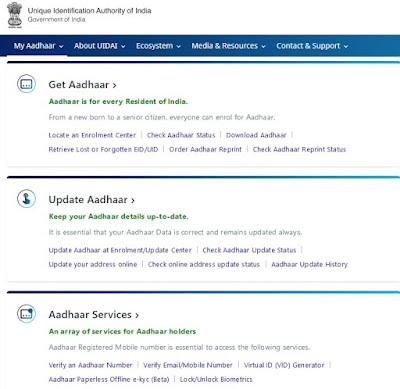
- On Aadhaar Homepage you will find various services displayed.
- Just click on Verify Email/Mobile Number which you will find under Aadhaar Services.
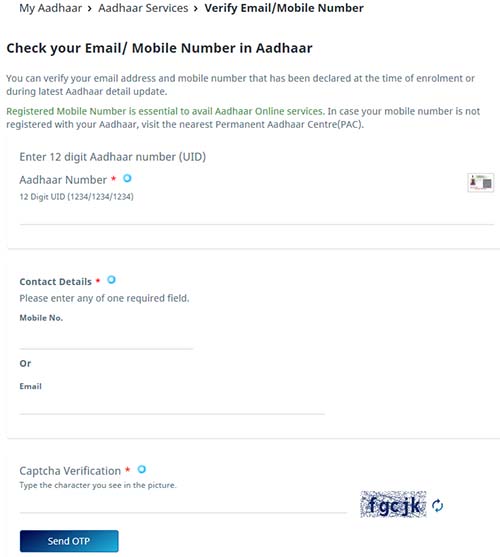
- A new page of Check your Email/ Mobile Number in Aadhaar will get option, just enter your 12 digit Aadhaar Number, under contact details enter your email id, and complete the capctha verification.
- Just click on send one time password.
- You will receive otp on your regsitered email id.
- Enter the received OTP via email in enter otp field and click on submit button.
- On next screen you will get message your email id is verified.
- Note down that you can verify your email id only once, and if you try to do second time then you will get a message displayed "The email you have entered already verified with our records."
Unable to update is there any new link to update E-mail?
ReplyDeleteMy Aadhar Card Mobiles No is wrong...
ReplyDeleteHello, Deena Dhayalan
DeleteFollow this link to Correct Your Mobile Number Online : http://e-aadhaar-card.blogspot.com/2013/03/verify-aadhaar-card-mobile-number.html
Dear Admin,
DeleteEmail update link is not working.
Dear Admin,
DeleteEmail update link is not working
i want to add my email id in my aadhar detail, but the link you provided shows a blank page.
ReplyDeleteDear Smijeeth J,
DeleteThe which we have provided to update you email id works perfectly, we have tested it just now.
But you can try out to open the link in different browser like Google Chrome or Firefox, if still problem exists just clear your browser cookies and history and try to open it will work.
Hope this info was useful to you.
Regards
I had same problem as Smijeeth.
Deletewhen I submit my information and click link for verification, next page is always blank. I have tried all browser but no result.
Well I tried the above link in firefox and internet explorer, Once you enter your aadhar number, Name & email address and click on generate code you get a blank page
DeleteLost aadhar card but having my mothers aadhar card no: 233239377790 and elder sisters aadhar card no:977157624887
ReplyDeleteHI,
ReplyDeleteI have applied for my Aadhaar card .but still i have not received through post when i checked online status by using enrolment number it is showing your aadhaar card has been generated. but i am unable to download the Aadhaar card as i have change my mobile no . please can you send me my aadhar card on mail so that i can take print out for future use.
Enrolment no:1377/40307/03370
Date:14/06/2013 12:36:38
Dear Amitabh Sigh,
DeleteIf your Aadhaar Card have been generated, than you can download your Aadhaar Card PDF to know just follow this link: http://e-aadhaar-card.blogspot.com/2013/03/how-to-download-e-aadhaar-card-letter.html
Regards
how to add email id to mt aadhar
ReplyDeleteDear Bonny Singh,
DeleteCurrently the feature to verify email id is offline please check back after few days
Regards
when i submitted the details, the page loaded and resulted in a blank page. After that, the link you provided also resulted in a blank page. What to do n how to do?
ReplyDeleteDear Jigar Joshi,
DeleteThe email-verification portal is having some problem, please check back later after few days
Regards
how to download AADHAAR from abroad
ReplyDeleteDear Shinil,
DeleteFollow this link http://e-aadhaar-card.blogspot.com/2013/05/download-e-aadhaar-card-free-of-cost.html to download your Aadhaar Card Copy
link does work after resetting internet explore - asks for usercode, password & access code - i have no idea what are those? can you help
ReplyDelete